API / Backend
Intermediate
ScanPixels
ScanPixels
A Windows desktop pixel-monitoring tool, written in Visual C++ / MFC (originally authored 2012–2013, VC6 era, later upgraded to a modern Visual Studio solution).
The solution is made of two cooperating applications that talk to each other over a broadcast Windows message:
Project Role What it does
ScanPixels Sender / scanner Captures a region of the desktop, scans pixels in real time, and broadcasts a registered Windows message whenever a pixel changes.
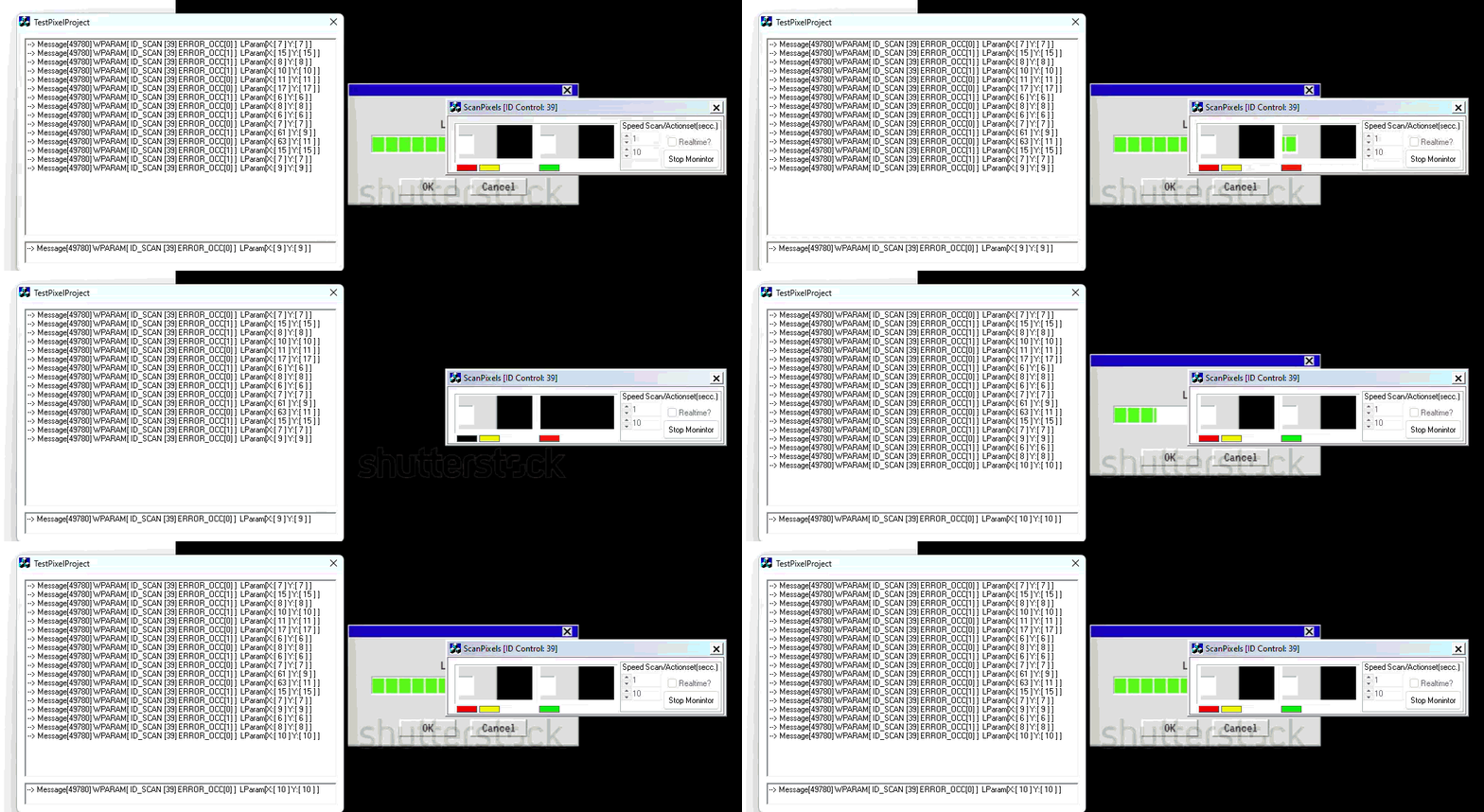
TestPixelProject Receiver / demo client Registers the same broadcast message and prints every event it receives (ID, error flag, X, Y) into a list.
Together they demonstrate a simple but complete inter-process pixel-change notification system on Windows, using RegisterWindowMessage + PostMessage(HWND_BROADCAST, ...).
Table of contents
How it works
The protocol between the two apps
ScanPixels — the scanner
TestPixelProject — the receiver
Building
How to use it
Project layout
How it works
The idea is straightforward:
ScanPixels takes a snapshot of the desktop at the moment the user presses Start, blits it into a child frame on its dialog, and remembers where on the screen that snapshot came from.
On every timer tick, it picks the next pixel in a row-major sweep across that frame, reads the frozen color from the snapshot, then reads the current color from the live desktop at the matching screen coordinate.
If the two pixels differ, a "change detected" event is generated:
the dialog's status flags change color, and
a Windows message (WHM_SCANPXL) is broadcast to every top-level window carrying the client ID, an error flag, and the (X, Y) coordinate of the differing pixel.
TestPixelProject (or any other process that registers the same message name) receives every broadcast and can react to it — log it, trigger automation, sound an alarm, etc.
Because the channel is a registered broadcast message, the two apps are decoupled: the scanner does not need to know who is listening, and any number of listeners can run at the same time.
The protocol between the two apps
Both apps register the same message name with RegisterWindowMessage:
m_MsgPixelScan = ::RegisterWindowMessage(_T("WHM_SCANPXL"));
RegisterWindowMessage returns the same UINT system-wide for a given string, so the sender and any receiver agree on the message ID without hard-coding a number.
ScanPixels broadcasts events with:
::PostMessage(HWND_BROADCAST,
m_MsgPixelScan,
MAKELONG(m_unIDClient, m_ErrorDetected),
MAKELONG(m_nScanX, m_nScanY));
Payload layout:
Param High word Low word
WPARAM m_ErrorDetected (0 = match, 1 = fresh mismatch, 2 = mismatch already reported) m_unIDClient (random per-instance ID, set in OnInitDialog)
LPARAM m_nScanY (pixel Y inside the scan frame) m_nScanX (pixel X inside the scan frame)
m_unIDClient is generated at startup with a properly seeded rand() and shown in the dialog title (ScanPixels [ID Control: <id>]) so multiple scanners can be told apart by listeners.
ScanPixels — the scanner
Source: ScanPixels.cpp, ScanPixelsDlg.cpp / .h, resources in ScanPixels.rc.
Dialog controls
ID Type Purpose
IDC_BUTTON_START Button Start / Stop monitoring. Captures a fresh desktop snapshot on every Start.
IDC_STATIC_FLAMEPIXELS Static frame The scan area — desktop snapshot is blitted here at start.
IDC_STATIC_FLAG Static Red when the current pixel matches the snapshot, black when it differs.
IDC_STATIC_FLAG2 Static "Working" indicator — flashes red when a scan line wraps to the next row, yellow mid-scan.
IDC_STATIC_FLAG3 Static Overall status — green when no error, red when an error is currently held.
IDC_EDIT2 + IDC_SPIN_SPEED Edit + Spin Scan timer interval in ms (m_unTimerSpeed, default 10). Lower = faster scanning.
IDC_EDIT1 + IDC_SPIN_ACTIONSET Edit + Spin Action timer interval in ms (m_unTimerAction, default 1). Controls how soon WHM_SCANPXL is fired after a state change.
IDC_CHECK_REALTIME Checkbox If checked, the action timer keeps firing on every tick — listeners receive a continuous stream while the state holds. If unchecked, the action timer fires once per state transition and is killed afterwards (edge-triggered).
Internal flow
OnInitDialog
Registers a custom window class with a black background brush.
Builds a rounded / cut region for the scan frame (CreateHole).
Creates the inner frame window m_hWndFrame as a child of IDC_STATIC_FLAMEPIXELS.
Configures spin ranges, default speed (10) and action delay (1).
Seeds rand() with GetTickCount() and uses it to generate m_unIDClient; writes the title bar.
OnButtonStart — toggles monitoring (clean two-branch state machine).
When stopped → takes a fresh snapshot via CaptureWnd(GetDesktopWindow(), m_hWndFrame, TRUE), which BitBlts the desktop pixels into the frame at (m_nxSrc + kCaptureOffsetX, m_nySrc + kCaptureOffsetY). Resets scan position and edge-detection flags. Starts TIMER_SCAN at m_unTimerSpeed ms. Sets m_bContinues = true. Disables the speed/edit/checkbox/action controls. Label becomes "Stop Monitor".
When running → kills both timers, sets m_bContinues = false, re-enables the controls, label becomes "Start Monitor".
OnTimer (timer TIMER_SCAN — scan tick)
Increments m_nScanX. When it reaches half the frame width, wraps back to kScanStartX, increments m_nScanY, and flashes IDC_STATIC_FLAG2 red. When m_nScanY reaches the frame height, wraps back to kScanStartY. This produces a true 2D row-major sweep of the scan area.
Calls ComparePixels(m_nScanX, m_nScanY).
ComparePixels(nX, nY) (returns TRUE when pixels differ)
Reads ddcFrame.GetPixel(nX, nY) — the frozen snapshot pixel.
Reads ddcDesktop.GetPixel(m_nxSrc + kCaptureOffsetX + nX, m_nySrc + kCaptureOffsetY + nY) — the live desktop pixel at the matching screen position.
If equal → IDC_STATIC_FLAG red, clear that cell in m_Error, m_ErrorDetected = kErrorNone.
If different → IDC_STATIC_FLAG black, mark m_Error[nX][nY] = nX + nY, m_ErrorDetected = kErrorFresh.
Updates IDC_STATIC_FLAG3 (green / red).
On any edge (rising = OK→error, or falling = error→OK), schedules TIMER_ACTIONSET with delay m_unTimerAction.
OnTimer (timer TIMER_ACTIONSET — action tick)
Broadcasts WHM_SCANPXL (see protocol above) when m_ErrorDetected != kErrorReported.
If IDC_CHECK_REALTIME is off, kills TIMER_ACTIONSET so only one broadcast goes out per state change. If on, the timer is left running for continuous notifications.
OnMove — keeps m_nxSrc, m_nySrc in sync with the dialog's screen position so the live-pixel lookup follows the window.
Note: Because the dialog itself sits over its own snapshot, kCaptureOffsetX (132) and kCaptureOffsetY (12) shift the live read so it targets the desktop behind the dialog, not the dialog's own pixels. Moving the window after pressing Start changes which area of the desktop is being compared against the original snapshot — pressing Start again grabs a fresh snapshot at the new position.
TestPixelProject — the receiver
Source: TestPixelProject/TestPixelProjectDlg.cpp / .h.
A minimal MFC dialog whose only job is to prove the protocol works by listening for WHM_SCANPXL broadcasts and showing every event.
Dialog controls
ID Type Purpose
IDC_EDIT1 Edit Shows the most recent event as a formatted string.
IDC_LIST1 List box Appends every event received. Double-click to clear the list.
How it listens
OnInitDialog registers the message once, and WindowProc filters every incoming message for it:
BOOL CTestPixelProjectDlg::OnInitDialog()
{
CDialog::OnInitDialog();
// ...icon setup...
m_MsgPixelScan = ::RegisterWindowMessage(_T("WHM_SCANPXL"));
return TRUE;
}
LRESULT CTestPixelProjectDlg::WindowProc(UINT message, WPARAM wParam, LPARAM lParam)
{
if (m_MsgPixelScan != 0 && message == m_MsgPixelScan)
{
CString strFormat;
strFormat.Format(
_T("--> Message[%u] WPARAM[ ID_SCAN [%u] ERROR_OCC[%u] ] LParam[X:[ %u ] Y:[ %u ] ]"),
message,
LOWORD(wParam), HIWORD(wParam),
LOWORD(lParam), HIWORD(lParam));
SetDlgItemText(IDC_EDIT1, strFormat);
m_ListCmd.AddString(strFormat);
}
return CDialog::WindowProc(message, wParam, lParam);
}
The fields are unpacked in the same order ScanPixels packs them, so the printout reads back: scanner client ID, error flag, X, Y.
Double-clicking the list (OnDblclkList1) calls m_ListCmd.ResetContent() to clear the log.
Why a separate process? This is the core of the demo: WHM_SCANPXL is a broadcast message, so any application — running in any process, started before or after ScanPixels — that registers the same string with RegisterWindowMessage will pick the events up. TestPixelProject is the simplest possible such consumer.
Building
The project targets Win32 (x86) and uses MFC with shared / static MFC libraries depending on configuration.
Two solution files are present, kept for historical reasons:
ScanPixels.dsp / ScanPixels.dsw — original Visual C++ 6.0 workspace (1998 / 2002 era).
ScanPixels.sln + *.vcxproj — modern Visual Studio solution (upgraded format, opens in VS 2010 and later, including VS 2022).
Recommended (modern Visual Studio)
Open ScanPixels.sln in Visual Studio (2010 or later — tested with VS 2022).
The solution contains both projects: ScanPixels and TestPixelProject.
Make sure the active platform is Win32 (the projects are 32-bit).
Choose Build → Build Solution (Ctrl+Shift+B). Both EXEs will be produced.
ScanPixels.exe lands in Debug/ or Release/ at the solution root.
TestPixelProject.exe lands in TestPixelProject/Debug/ or TestPixelProject/Release/.
Requirements
Windows (the apps use Win32 + MFC + GDI directly — they do not run on non-Windows platforms).
An MFC-capable Visual C++ toolset. In modern VS installers, install the workload Desktop development with C++ and tick MFC for v* build tools (Individual Components → MFC).
Optional: original VC6 workspace
ScanPixels.dsw can still be opened by Visual C++ 6.0 if you want to see the project as it was originally authored. Modern Visual Studio will offer to upgrade it to a .vcxproj on open.
How to use it
Start the listener first. Run TestPixelProject.exe. It does nothing visible until events arrive.
Run the scanner. Run ScanPixels.exe. The title shows its randomly assigned client ID, e.g. ScanPixels [ID Control: 12345].
Position the window over the area of the desktop you want to monitor. The "scan frame" inside the dialog is the region that will be sampled.
Adjust the timers (optional):
Speed (IDC_EDIT2 / spin) — milliseconds between scan ticks. 10 is a good starting value; smaller = faster but heavier on CPU.
Action set (IDC_EDIT1 / spin) — milliseconds before the broadcast fires after a state change.
Real-time checkbox — leave on to receive a continuous stream while a difference persists; turn off to receive one notification per transition (edge-triggered).
Press Start Monitor. ScanPixels takes a fresh desktop snapshot of the area behind the frame and starts a row-major sweep across the scan area. The flags on the dialog reflect live status:
Green flag → all sampled pixels match the snapshot.
Red flag → at least one pixel has changed since the snapshot was taken.
Watch TestPixelProject. Every state change appears as a new line in the list:
--> Message[49xxx] WPARAM[ ID_SCAN [12345] ERROR_OCC[1] ] LParam[X:[ 27 ] Y:[ 27 ] ]
ID_SCAN — which scanner sent it (multiple ScanPixels instances can run at once).
ERROR_OCC — 0 = pixels match, 1 = fresh mismatch, 2 = mismatch already reported (suppressed unless real-time is on).
X, Y — coordinate inside the scan frame where the difference was found.
Press Stop Monitor to halt scanning. The control fields become editable again so you can adjust speeds and start a new run.
Double-click the list in TestPixelProject to clear it.
Running multiple scanners or multiple listeners
Because the channel is a system-wide broadcast keyed by message name:
You can run N copies of ScanPixels.exe over different desktop regions; each gets its own m_unIDClient and listeners can distinguish them.
You can run N copies of TestPixelProject.exe (or any custom listener that registers WHM_SCANPXL); all of them receive every event.
Project layout
ScanPixels/
├── ScanPixels.sln Modern VS solution (contains both projects)
├── ScanPixels.dsw / .dsp Original VC6 workspace (kept for history)
├── ScanPixels.cpp / .h CScanPixelsApp — the MFC application class
├── ScanPixelsDlg.cpp / .h CScanPixelsDlg — main dialog, scanning + broadcast logic
├── ScanPixels.rc Dialog template, icons, resources
├── resource.h Control IDs (IDC_*, IDD_*)
├── StdAfx.cpp / .h Precompiled header
├── res/ Icons and .rc2 includes
│
└── TestPixelProject/
├── TestPixelProject.vcxproj Project file
├── TestPixelProject.cpp / .h CTestPixelProjectApp
├── TestPixelProjectDlg.cpp/.h CTestPixelProjectDlg — listener, formats events
├── TestPixelProject.rc Dialog template
├── resource.h
├── StdAfx.cpp / .h
└── res/
Build artifact directories (Debug/, Release/, Release_Bin1/, .vs/, Backup/) and IDE-state files (*.suo, *.opt, *.aps, *.ncb, *.user) are not part of the source — they are produced by the build and can be safely deleted at any time.
2026-05-12 14:16
C++
Win API
Pixels